Farming Simulator 25 offers endless opportunities for customizing your farm, and mods are the perfect way to expand gameplay. You can add new vehicles, machinery, maps, and gameplay features created by the community, making your farm more productive and fun.
Using the In-Game ModHub
The safest way to get mods is through the in-game ModHub:
- Open Farming Simulator 25 and go to the main menu.
- Click on ModHub to browse available mods.
- Filter by categories such as Vehicles, Maps, or Equipment.
- Select the mod you want and click Download.
- Activate the mod in your saved game to start using it immediately.
Manual Installation
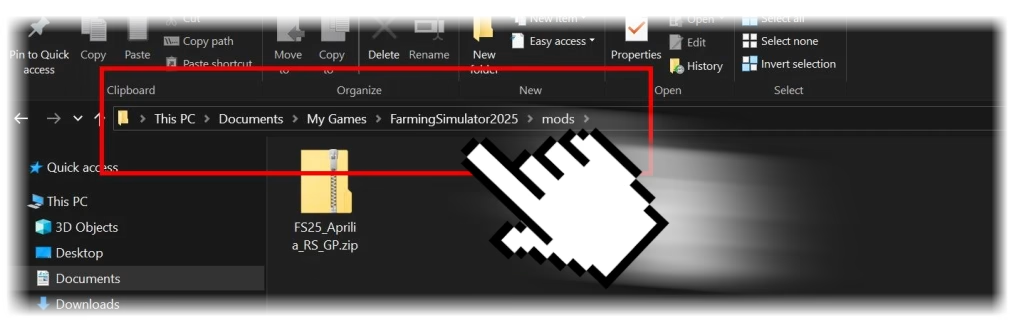
Some mods are only available on third-party sites. To install these:
- Download the mod file, usually in
.zipformat. - Navigate to
Documents\My Games\FarmingSimulator25\mods. - Place the
.zipfile into themodsfolder without extracting it. - Start the game and enable the mod in your save game menu.
Best Practices
- Always download mods from trusted sources to avoid game crashes.
- Check for mod updates after game patches to ensure compatibility.
- Remove unused mods by deleting them from the
modsfolder.
By following these steps, you can easily add new content to Farming Simulator 25, making every farm unique and full of new experiences.